Create a Zenodo DOI
TL;DR
If you just want to create or update, jump to the section you need:
| Case | When | What you do |
|---|---|---|
| First time | No Zenodo record exists yet | On Zenodo: create a new upload, reserve a DOI, publish (manual) |
| Update | A Zenodo record already exists | Publish a GitHub Release; the Action creates New version (or do New version yourself). Main ID stays; new sub-ID |
The Zenodo DOI workflow fits into the broader Trust over IP process for publishing a Spec-Up-T specification as a ToIP Approved Deliverable.
This page explains how to assign a Zenodo DOI to a Spec-Up-T specification. It is written for people who need a permanent citation link and do not want to learn Zenodo in depth.
What you get
A DOI is a permanent, citable link. Zenodo stores a ZIP copy of your specification repository and gives you:
- Main ID (Zenodo calls this the Concept DOI) — one ID for the work as a whole. It never changes. It always resolves to the latest published version.
- Sub-ID (Zenodo calls this a Version DOI) — one ID per published snapshot. Each new published version gets a new sub-ID.
Prefer embedding the main ID in the specification once you have it (after the first publish). That keeps one stable link in the document forever. Until then, embed the reserved sub-ID so the first release ZIP already contains a DOI.
Example main ID (Concept DOI): 10.5281/zenodo.18792085
Example sub-ID (Version DOI): 10.5281/zenodo.18797357
Example markdown link (use the main ID when available):
[https://doi.org/10.5281/zenodo.18792085](https://doi.org/10.5281/zenodo.18792085)
Where you must do this
Zenodo itself does not care which GitHub branch or repository you use. Here we will do this on the main branch of the original repository, to keep it simple.
Do the following there:
- Embed or update the DOI in the specification source when needed (and merge that change to
mainfirst) - Create the Git tag and GitHub Release
- First time only: upload the release ZIP to Zenodo and publish. Later updates: the GitHub Action (or a manual New version) does that
Automatic versus Manual
These are different paths:
| Path | When to use it |
|---|---|
| First publish (manual) | Required if the DOI must already be inside the first ZIP. Reserve a DOI, embed it, create a GitHub Release, upload that ZIP, then Publish. Zenodo’s built-in GitHub integration cannot reserve a DOI in advance, so this guide does not use it for the first publish. |
| Later updates (GitHub Action) | Preferred after the first publish exists. A GitHub Release triggers .github/workflows/zenodo-update.yml, which creates a Zenodo New version, uploads the ZIP, and publishes. Do not run that Action for the first publish — it only does updates. |
| Later updates (manual) | Same result: New version on the existing record. Use this if the Action is not wired yet, or as a fallback. |
For a first publish, reserve the DOI before you publish. Zenodo lets you reserve it so you can put it in the document first. It becomes official only when you click Publish. After that, prefer the main ID in the specification; later updates usually do not need a new reserved DOI in the source.
Grant yourself manage access
If a Zenodo record already exists and is owned by an organization account, the Zenodo user behind ZENODO_USER_API_TOKEN (or anyone publishing New version in the Zenodo UI) needs Can manage on that record. GitHub releasers do not need a Zenodo account when the Action is wired. Repeat the steps below for every repository (and its Zenodo record) the automation must update.
- Create an account on zenodo.org if you do not have one.
- An institutional email address is preferred. A personal or custom-domain address can also work.
- After you create the account, your username may not appear in Zenodo’s user search right away. Waiting overnight has been enough in practice for the account to become findable.
- Someone who already has manage rights — typically while logged in with the organization Zenodo account — must add you with Can manage rights on the relevant record (or community).
- When searching for users in Zenodo’s share/access UI, the search is not debounced. Type the name and let the search finish before assuming there is no match.
First time
Goal:
- create the Zenodo record
- get the main ID + first sub-ID
- put a DOI link in the specification.
1. Reserve a DOI on Zenodo
-
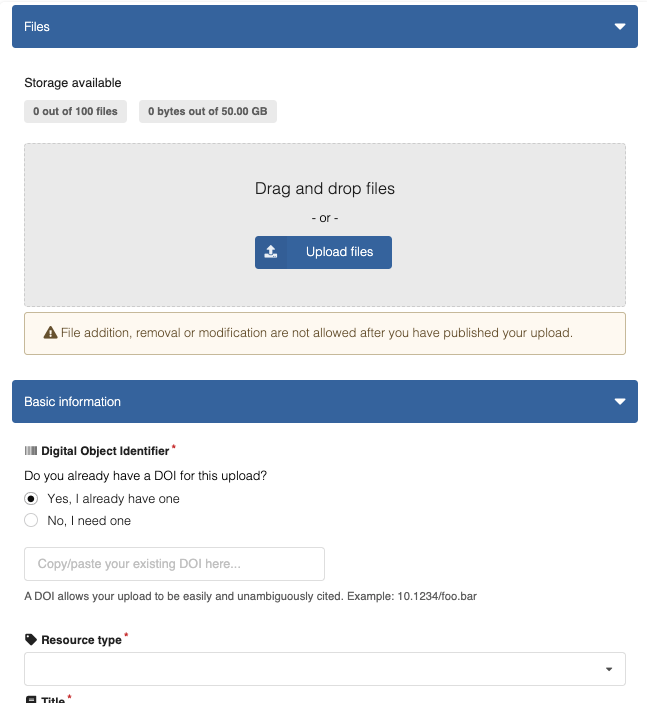
Go to https://zenodo.org/uploads/new
-
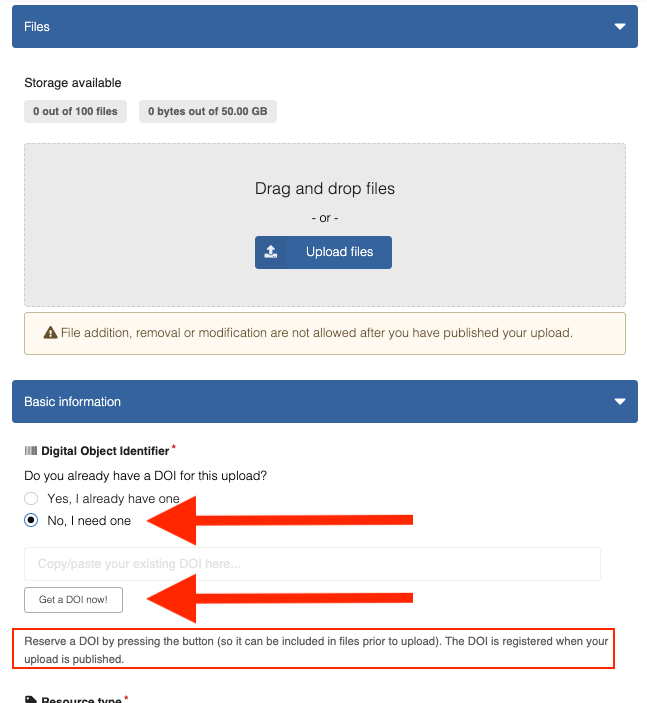
When asked whether you already have a DOI, choose "No, I need one"
Zenodo shows: "Reserve a DOI by pressing the button (so it can be included in files prior to upload). The DOI is registered when your upload is published."
-
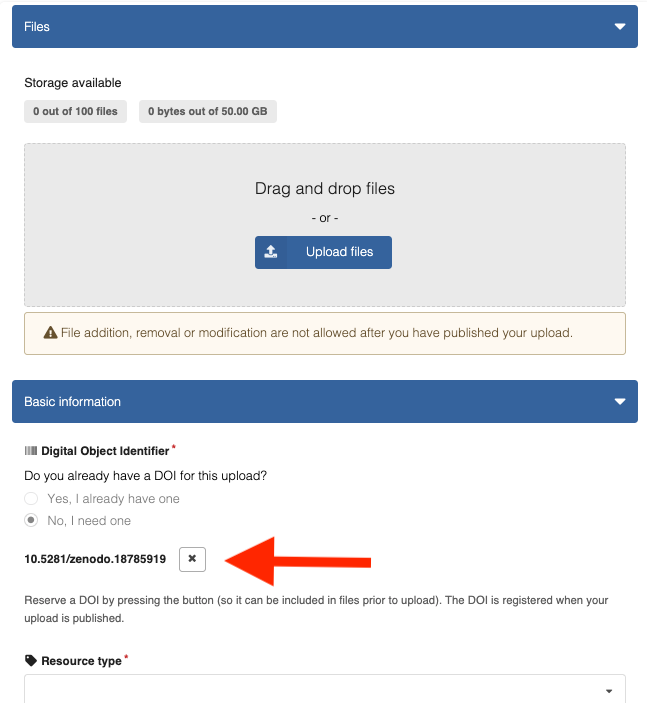
Click the button to reserve a DOI
-
Build the URL:
https://doi.org/+ the reserved DOI (this is the first sub-ID; the screenshot above shows10.5281/zenodo.18785919)
Example:https://doi.org/10.5281/zenodo.18785919
Keep this Zenodo draft open. You will return to it in step 4.
2. Put the DOI in the specification on main
Zenodo itself does not care which GitHub branch or repository you use. Here we will do this on the main branch of the original repository, to keep it simple.
- Paste a markdown link with the reserved DOI near the top of the source (for example in
spec-head.md) - Commit and push so the change lands on the original repository’s
mainbranch
The reserved DOI is the first sub-ID. After you publish (step 4), Zenodo also shows the main ID. Prefer updating the specification to the main ID once it is available, so the link in the document stays stable forever.
3. Create a GitHub Release from main
On the original repository:
- Open Releases → Create a new release
- Create a new tag from
main(for examplev1.0) - Enter a title, publish the release
GitHub builds a ZIP of the repository at that tag. Download that ZIP.
4. Upload the ZIP and publish
- Return to the Zenodo draft from step 1
- Upload the GitHub Release ZIP
- Fill in the required metadata (title, creators, description, …)
- Click Publish
You now have:
- a sub-ID for this first snapshot (the DOI you reserved)
- a main ID for the work as a whole (shown on the Zenodo record; never changes)
If the specification still embeds the reserved sub-ID, switch it to the main ID on main before the next release. You usually never change that line again.
Then wire the GitHub Action so later updates are automatic: Enable automatic updates.
Details: Zenodo — reserve a DOI.
Update
Goal: publish an updated ZIP without creating a second, unrelated Zenodo record. The main ID stays. Zenodo issues a new sub-ID for the new snapshot.
Do not start a fresh upload at https://zenodo.org/uploads/new for the same specification. Use New version on the existing record (the GitHub Action does this for you).
You do not open Zenodo for a normal update. After the first publish exists:
- Merge to
main. - Publish a new GitHub Release (new tag — do not reuse an old one).
- Wait for the Action Publish release to Zenodo (update) to finish green.
Worked example: blockchainbird/test-zenodo.
Enable automatic updates (once per repository)
Do this once per specification repository, after the first Zenodo publish exists. The Action only does updates — do not run it for the first publish.
- Copy
.github/workflows/zenodo-update.ymlunchanged. It has no hardcoded repository name or DOI. - Create a Zenodo API token at https://zenodo.org/account/settings/applications/tokens/new/. Enable both
deposit:writeanddeposit:actions. Copy it once; do not commit it to git. - In that GitHub repo: Settings → Secrets and variables → Actions (
https://github.com/OWNER/REPO/settings/secrets/actions). Use repository secrets and repository variables only. Do not use Environment or Organization secrets/variables — this workflow only reads the repository ones.
ZENODO_USER_API_TOKEN must be a repository secret. If you store it as an Environment secret or an Organization secret, the Action will not see it.
ZENODO_SPEC_MAIN_DOI must be a repository variable, not a secret. If you create it as a secret, or as an Environment or Organization variable, the Action will not see it and will fail with “Set variable ZENODO_SPEC_MAIN_DOI”.
Repository secret (required) — bound to a Zenodo user. On the Secrets tab, under Repository secrets, click New repository secret:
| Name | Value |
|---|---|
ZENODO_USER_API_TOKEN | The token from step 2 (full string, no spaces). The same token may be reused in other spec repos if that Zenodo user can manage those records. |
Repository variable (required in practice) — bound to this specification. Open the Variables tab → under Repository variables, click New repository variable:
| Name | Value |
|---|---|
ZENODO_SPEC_MAIN_DOI | This repo’s main ID only, e.g. 10.5281/zenodo.18792085. One main ID per specification — do not share it across ACDC / CESR / KERI. |
Repository secret (optional if the main ID variable is set):
| Name | Value |
|---|---|
ZENODO_SPEC_LATEST_DEPOSITION_ID | Numeric id of the latest published version only |
Prefer ZENODO_SPEC_MAIN_DOI. Then you do not need to bump a deposition id after every release.
The Zenodo user behind the token must own the record or have Can manage on it. See Grant yourself manage access.
None of these names are Zenodo or GitHub reserved words. They are labels chosen for this workflow; only the workflow file must use the same names.
There is also GITHUB_TOKEN: GitHub creates it automatically for each workflow run. You do not configure it. It only downloads the release ZIP from GitHub — it does not talk to Zenodo.
Who owns the token, the DOI, and the permission to release
| Name | What it is | Bound to a Zenodo user? | Bound to this GitHub repo? | Same value in every spec repo? |
|---|---|---|---|---|
ZENODO_USER_API_TOKEN | Zenodo personal access token | Yes — belongs to whoever created it | Stored as a repository secret in each repo; the token itself is not owned by GitHub | Can be — one org/service token may be pasted into many repos |
ZENODO_SPEC_MAIN_DOI | Main ID of one specification | No — identifies this spec | Stored as a repository variable in each spec repo | No |
ZENODO_SPEC_LATEST_DEPOSITION_ID | Numeric id of one published Zenodo version | No | Yes (optional if main ID is set) | No |
What actually runs when someone publishes a GitHub Release:
GitHub user clicks “Publish release”
        ↓
GitHub Action starts in THAT repo
        ↓
Uses repository secret ZENODO_USER_API_TOKEN  ← Zenodo account that created the token
Uses repository variable for THAT spec’s main ID
        ↓
Zenodo API: new version → upload ZIP → publish
Consequences:
- The person who creates the GitHub Release does not need a Zenodo account. They need permission to publish releases on that GitHub repo (Write / Maintain / Admin).
- The Action always uses the repo’s
ZENODO_USER_API_TOKEN, not the releasing user’s GitHub or Zenodo identity. If that Zenodo user cannot manage the record, the Action fails — even if the GitHub release succeeded. - Reusing the same token string in several repos is fine only if that Zenodo user has Can manage on all of those records (or owns them).
- Each specification repo must store its own main ID. Do not copy one spec’s DOI into another repo.
- Rotating the token: create a new token on Zenodo, update the GitHub repository secret in every repo that used the old one, revoke the old token.
- Revoking a Zenodo user’s access on a record does not remove the GitHub repository secret — the next release will fail until someone fixes the token or Zenodo permissions.
Publish an update
Zenodo itself does not care which GitHub branch or repository you use. Here we will do this on the main branch of the original repository, to keep it simple.
If you are switching the embedded link from the first sub-ID to the main ID, do that on main before releasing. If the specification already embeds the main ID, you usually do not need to change the DOI text again.
Then:
- Merge whatever you want onto
main. - Create a new GitHub Release / tag from
main(for examplev1.1.0). Do not reuse an old tag. - Wait for the Action Publish release to Zenodo (update) to finish green.
- Done. Main ID is unchanged. Zenodo has a new sub-ID for this snapshot.
Check:
- Actions tab → latest run of
zenodo-update.yml→ success https://doi.org/YOUR_MAIN_ID→ shows the new version
CLI equivalent:
git checkout main
git pull
# ... commits already on main ...
gh release create v1.1.0 --title "v1.1.0" --notes "…" --target main
gh run list --workflow=zenodo-update.yml --limit 1
Several specification repositories
Example Trust over IP repos (each is its own GitHub repo and its own Zenodo record):
| Specification | GitHub repo |
|---|---|
| ACDC | trustoverip/kswg-acdc-specification |
| CESR | trustoverip/kswg-cesr-specification |
| KERI | trustoverip/kswg-keri-specification |
Recommended layout (simplest for releasers):
-
One Zenodo account used for automation (an org account, or a dedicated “github-actions” Zenodo user — not each releaser’s personal account unless you want that).
-
One API token from that account (
ZENODO_USER_API_TOKEN). -
On Zenodo, that account owns each record or has Can manage on each of them (grant access if records live under another login).
-
In each GitHub repo, under Settings → Secrets and variables → Actions, add a repository secret and a repository variable (not Environment or Organization):
Repo Repository secret ZENODO_USER_API_TOKENRepository variable ZENODO_SPEC_MAIN_DOIkswg-acdc-specificationsame shared token ACDC main ID only kswg-cesr-specificationsame shared token CESR main ID only kswg-keri-specificationsame shared token KERI main ID only -
Add
.github/workflows/zenodo-update.ymlto each repo (copy unchanged).
After that, anyone with GitHub Release permission on the repo: merge to main → Releases → New release → new tag → Publish. The Action uses the repo’s token and repo’s main ID — no Zenodo login required.
Do not:
- Expect each releaser to paste their personal Zenodo token into GitHub — brittle, and most personal tokens will lack manage rights on org-owned records.
- Use one main ID for all three specs — each repo must point at its own Zenodo main ID.
- Assume “I released on GitHub” implies Zenodo updated — check the Actions tab if the DOI version did not move.
- Store
ZENODO_USER_API_TOKENas an Environment secret or Organization secret. It must be a repository secret. - Store
ZENODO_SPEC_MAIN_DOIas a secret, or as an Environment or Organization variable. It must be a repository variable. - Put a new sub-ID into the spec on every release if the main ID is already there.
Manual fallback: New version in the Zenodo UI
Use this if the Action is not wired yet, or if you need to recover from a failed run.
On the original repository:
- Make source changes on
main(including switching to the main ID if you still have the first sub-ID in the document) - Releases → Create a new release → new tag from
main→ publish - Download the GitHub Release ZIP
Then on Zenodo:
- Open the existing record
- Click New version
- Upload the new ZIP (and adjust metadata if needed)
- Click Publish
Result: main ID unchanged; new sub-ID for this snapshot only.
Details: Zenodo — manage versions.
Do not overwrite a published Zenodo record’s files as the normal update path. Zenodo treats published files as fixed. For real updates, use New version (the Action, or the UI above).
Minor file fixes are only allowed briefly after publish (Zenodo’s own grace window); prefer New version unless Zenodo’s UI explicitly offers a minor file correction and you are still within that window.
Quick troubleshooting
Action fails: missing secrets or “Set variable ZENODO_SPEC_MAIN_DOI”
The error mentions ZENODO_USER_API_TOKEN, ZENODO_SPEC_MAIN_DOI, or a deposition id.
- Re-do Enable automatic updates. Token scopes must include
deposit:writeanddeposit:actions.ZENODO_USER_API_TOKENmust be a repository secret (Settings → Secrets and variables → Actions → Repository secrets), not an Environment or Organization secret. - If you see “Set variable
ZENODO_SPEC_MAIN_DOI”: the main ID was stored as a secret, as an Environment or Organization variable, or the name is misspelled. Use Settings → Secrets and variables → Actions → Variables → Repository variables (not Secrets). Name must be exactlyZENODO_SPEC_MAIN_DOI. Value like10.5281/zenodo.18792085.
Action fails: leftover draft / “Please remove all files first”
An unpublished New version draft is leftover from a previous failed run. The current workflow tries to discard those automatically.
If it still fails: https://zenodo.org/deposit/ → unpublished draft for this spec → Discard → re-run the Action.
Action fails: upload HTTP 400 / “Empty files are not accepted”
The ZIP on the runner can be fine while Zenodo rejects the upload transport. The current workflow uploads with Python (Content-Length + application/octet-stream) for that reason. Confirm main has that workflow, then discard any leftover unpublished draft and re-run the Action.
This is not rate limiting. Rate limits return HTTP 429.
Action fails: 403 / permission denied from Zenodo
The repo’s ZENODO_USER_API_TOKEN is valid but the Zenodo user who owns that token cannot manage this spec’s record.
On Zenodo, grant that user Can manage on the record, or replace the repository secret with a token from an account that already has access. Releasers on GitHub do not need to change anything.
Wrong spec updated on Zenodo
ZENODO_SPEC_MAIN_DOI in that repo’s repository variables points at another specification. Fix the repository variable; it must be that spec’s main ID.
Wrong ZIP or missing DOI in the release
Zenodo itself does not care which GitHub branch or repository you use. Here we will do this on the main branch of the original repository, to keep it simple.
The release ZIP is generated from the commit the tag points to. Fix the source on main, create a new tag at the corrected commit, and let the Action publish (or upload that ZIP as a Zenodo New version).
git checkout main
git pull
# ... commit fixes on main ...
git tag v1.0.1
git push origin v1.0.1
gh release create v1.0.1 --title "v1.0.1" --target main
If the bad tag was never published to Zenodo, you may instead delete and recreate that same tag; once a Zenodo version exists for it, prefer a new tag and New version.
Accidental second Zenodo record
You started /uploads/new again instead of New version / the Action.
Stop. Use the original record’s main ID. Prefer fixing process over “merging” records (Zenodo does not merge concepts casually). Ask Zenodo support only if you truly published a duplicate by mistake.
Token leaked (chat, screenshot, commit)
- Revoke it in Zenodo applications settings.
- Create a new token (same scopes as Enable automatic updates).
- Update the GitHub repository secret
ZENODO_USER_API_TOKENin every repo that used the old token.