Embedding images
This page describes how images work from Spec-Up-T version 2.3.0 onwards. Check your version with npm list spec-up-t. On older versions, see Before version 2.3.0 at the end of this page.
In short
Put the image file in your spec repository and refer to it with a normal path, the same way you would link any file in the repository:

When Spec-Up-T renders the spec, it replaces that path with the full GitHub address of the image on the branch you are building:
https://raw.githubusercontent.com/<account>/<repo>/<branch>/images/Ecosystem.png
You never type a branch name yourself. An image you add on a feature branch points at that feature branch while you work, and points at main once the work is merged and main is rendered. You do not have to edit the link after merging.
Why the published page needs a full address
The rendered spec (docs/index.html) is published on its own, for example on GitHub Pages. The image files in your repository are not copied next to it. A short path like images/Ecosystem.png or /assets/img/photo.jpg would make the browser look for the image on the website, where it does not exist, and the image would break.
A full raw.githubusercontent.com address fetches the image straight from the GitHub repository. It works wherever the page is opened: on GitHub Pages, on another host, or as a file on your computer.
Before version 2.3.0 you had to type that full address yourself, including a branch name. Links typed on a feature branch kept pointing at that branch after it was merged, and broke when the branch was deleted. Spec-Up-T now builds the address for you, so this can no longer happen.
Step by step
1. Add the image to the repository
Put the file anywhere in your spec repository. Common choices:
images/at the root of the repositoryspec/images/, next to the markdown filesassets/img/
Use file names without spaces if you can, for example controller-app.png rather than Controller App.png. Spaces work, but they are easy to mistype.
2. Refer to the image from your markdown
Write a path to the file. There are three ways to write it, and all of them work:
| You write | Spec-Up-T looks for |
|---|---|
images/diagram.png | first spec/images/diagram.png, then images/diagram.png at the root of the repository |
../images/diagram.png | images/diagram.png at the root of the repository |
/assets/img/diagram.png | assets/img/diagram.png at the root of the repository |
The table assumes the markdown file is in spec/, which is the default.
Spec-Up-T resolves the path in the same order as GitHub's own markdown preview. A path is first read relative to the folder of the markdown file that contains it. If no file exists there, it is read from the root of the repository. A path that starts with / always starts at the root.
The most predictable choice is a path relative to the markdown file, such as ../images/diagram.png from a file in spec/. The image then also shows when you view that markdown file on GitHub.
A complete example, in spec/spec-body.md:

You can add a title that appears when the reader hovers over the image:

Always write a short description between the square brackets. Screen readers read it aloud, and it is shown if the image cannot load.
3. Render the spec
Render as usual, for example with npm run render, or through the menu.
In the terminal you will see a line like:
Rewrote 3 image source(s) using branch add-diagrams
That confirms Spec-Up-T found your images and turned them into full addresses.
4. Commit and push the image
The full address points at GitHub, so the browser can only show the image once the file is on GitHub. Until you commit and push the image file, it appears broken in your locally rendered spec. This is expected.
Spec-Up-T warns you about this during the render. For every image that is not yet on GitHub, the terminal shows a message such as:
Image images/controller-app.png is not on GitHub yet (branch add-diagrams). It will appear after you commit and push it.
Commit and push the image:
git add images/controller-app.png
git commit -m "Add controller diagram"
git push
Then refresh the rendered spec in your browser. The image appears; you do not need to render again.
The message only compares your computer with what it last heard from GitHub. If a teammate pushed the image, run git pull (or git fetch) first, so Spec-Up-T knows the image is already there.
5. Merge and publish
Merge the branch into main as usual. When main is rendered, for example by the GitHub Action that publishes your spec, every image address points at main. You do not have to change anything.
What the published address looks like
The address depends on where the spec is rendered:
| Rendered on | Image address uses |
|---|---|
Your computer, on branch add-diagrams | add-diagrams |
GitHub Actions, publishing main | main |
| GitHub Actions, a pull request from a branch in the same repository | the branch of the pull request |
| GitHub Actions, a pull request from a fork | the commit that was built, for example 3f2c9a1… |
A fork's branch does not exist in your repository, so Spec-Up-T uses the commit instead. That address always works.
Branch names that contain a slash, such as feature/diagrams, are written with refs/heads/ in front so GitHub reads the whole name:
https://raw.githubusercontent.com/<account>/<repo>/refs/heads/feature/diagrams/images/diagram.png
Full GitHub addresses you already have
Older specs often contain full addresses that include a branch, for example:
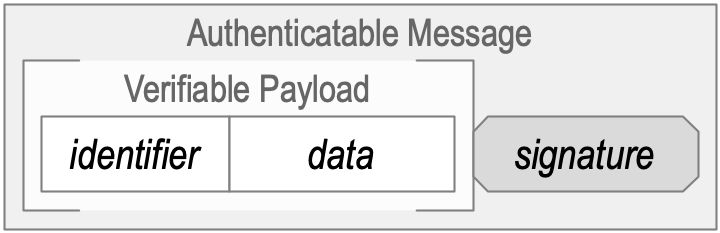
If the address points at your own repository (the account and repo in the source section of specs.json), and the file it names exists at that path in your repository, Spec-Up-T replaces the branch with the branch being built. In the example above, rendering main publishes:
https://raw.githubusercontent.com/trustoverip/kswg-keri-specification/main/images/AuthenticatableMessage.png
Addresses in the github.com/<account>/<repo>/blob/… and github.com/<account>/<repo>/raw/… forms are also converted to the raw.githubusercontent.com form.
You can keep these addresses, but a short path is easier to read and to maintain. Replacing them is optional.
Spec-Up-T leaves an address exactly as you wrote it when:
- It points at another repository. For example, an image in
WebOfTrust/keriused in atrustoveripspec. Spec-Up-T cannot know which branch of another repository you want. - It is pinned to a commit, such as
…/kswg-keri-specification/3f2c9a1e…/images/diagram.png. Use this when you want an image that never changes, even when the file is later edited. - It points at another website, such as
https://example.com/photo.jpg. - The file is not in your repository, for example because it was renamed or removed. Replacing the branch would give a broken address, so the old one is kept.
- The branch cannot be read reliably. In an address like
…/feature/x/images/a.png, the branch could befeatureorfeature/x. Spec-Up-T does not guess. Write a short path instead, or write the branch withrefs/heads/in front.
Images from another repository
For an image that lives in another repository, you still need its full raw address. The address in your browser when you look at an image on GitHub is usually not the image file. GitHub shows a page around the image (navigation, history, download). That page is HTML, even if the address ends in .png or .jpg:
https://github.com/WebOfTrust/keri/blob/main/images/prefix.png
The /blob/ part marks the HTML page. You need a raw address that returns the file itself. Any of these three methods gives you one.
Copy the image address
- Open the image file in the GitHub repository.
- Click Download.
- Right-click the displayed image and choose Copy Image Address.
Result: https://raw.githubusercontent.com/WebOfTrust/keri/main/images/prefix.png
Copy the download link
- Open the image file in the GitHub repository.
- Right-click Download and choose Copy Link.
Result: https://github.com/WebOfTrust/keri/raw/main/images/prefix.png
Append ?raw=true
Add ?raw=true to the address you already have. This is useful when you are fixing existing /blob/ links in an editor.
Original:
https://github.com/WebOfTrust/keri/blob/main/images/prefix.png
Modified:
https://github.com/WebOfTrust/keri/blob/main/images/prefix.png?raw=true
The branch in such an address (main above) stays as you wrote it. Choose a branch that will keep existing, usually main, or a commit if the image must never change.
Troubleshooting
The image is broken in my local render.
Check the terminal output of the render. If it says the image is not on GitHub yet, commit and push it, then refresh the page. If there is no such message, check the spelling of the path, including upper and lower case: Diagram.png and diagram.png are different files on GitHub.
The path was left unchanged in docs/index.html.
Spec-Up-T only rewrites a path when the file exists in the repository. Check that the file is where the path says, relative to the markdown file or to the root of the repository. Also check that source.account and source.repo in specs.json are filled in.
The image shows on my feature branch but not after merging.
Make sure the image file itself was merged into main, not just the markdown that refers to it. Then render main again.
The image address still contains an old branch name.
The address points at another repository, or the branch contains a slash without refs/heads/. See Full GitHub addresses you already have. Replace it with a short path to the file in your repository.
Before version 2.3.0
Versions before 2.3.0 publish every image address exactly as written. Use a full raw address, as described in Images from another repository, and point it at main rather than at a feature branch. Otherwise the image keeps pointing at the feature branch after merging, and breaks when that branch is deleted.